All posts by admin

7500 installations!

Today we celebrate 7500 installations of RosarioSIS, or 7500 answers to the Installation Poll!

32% increase

The months of February and March 2025 accumulated 194 answers, while the months of February and March 2026 accumulated 257 answers.

This is a 32% increase in a year!

What more?

What’s new in the Installation Poll for September 2026?

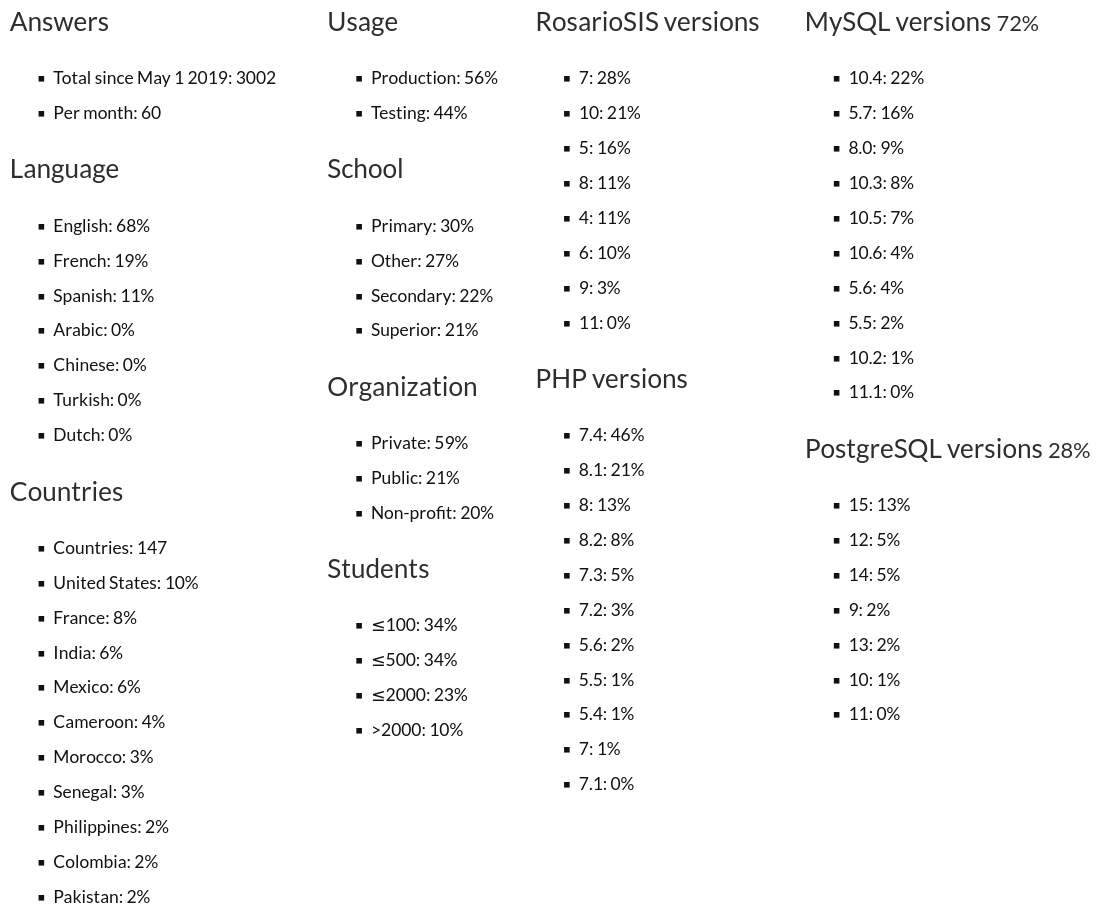
21 new countries since last year for a total of 195 countries. United States is still the most represented country, followed by India in third position.

RosarioSIS 12 is the most popular version. Version 13.0 is not released yet.

PHP 8.1 is still the most popular version in 2026, followed by 8.2. PHP 8.x is now representing 80% of the installation.

PostgreSQL is up by 5% compared to last year, slowly closing the gap with MySQL.

Production usage is up by 1% compared to last year.

Primary and secondary schools now represent 54% of the total, compared to 52% last year.

Private primary schools, counting with less than 500 students represent the most commonly reported use case.

installation_poll_7500

Top 5 Free Open Source Self-hosted School Management Systems

Are you looking to self-host a Student Information System for your school?

Self-hosting is your best choice for privacy, to control your data, where it is hosted and who can access it. This requires some technical skills and adds extra-work compared to SaaS solutions. That is especially true for some solutions that require you to have a dedicated server or VPS versus solutions you can have hosted on shared hosting, because the hosting provider takes care of most server administration tasks.

GitHub is the biggest directory for open source software. You may have ended looking for the `school-management` or `student-information-system` tag on GitHub, but here is the thing:

1. Not all projects are hosted on GitHub, so you might miss some interesting options.
2. The projects getting most stars may not be the best systems for production use, but instead the best projects to start developing your own upon. Stars are given by developers that liked the code and the technology or framework used, they may not even have tested the system in real conditions.

You may have also asked a generative AI “what is the best open source school management system”, but some systems will not appear in the list simply because they are not well referenced on the web, that does not mean they are not worth a try!

Deciding which system you go with can be time-consuming and is of importance if you want to choose a system that is future-proof, maintained and secure.

Here is a list and a detailed comparison of the best 5 school management software available for free, that you can self-host on your server or computer.

We’ve carefully selected which points we compare so you can make a choice depending on whether your school is large, or simply want to host the system on your own computer for your personal use / testing.

Below the comparison tables is a description of each of the 5 Student Information Systems we selected. This will give you an overview of what they are offering in terms of management and functionalities.

Installs on
RosarioSIS Shared hosting
Softaculous
Docker
Linux
Windows
Mac
Gibbon Shared hosting
Softaculous
Docker
Linux
Windows
Mac
OpenEduCat Shared hosting
Softaculous
Docker
Linux
Windows
Mac
Frappe Education Shared hosting
Softaculous
Docker
Linux
Windows
Mac
AlekSIS Shared hosting
Softaculous
Docker
Linux
Windows
Mac
Programming language
RosarioSIS PHP
Gibbon PHP
OpenEduCat Python
Frappe Education Python
AlekSIS Python
Based on an ERP
RosarioSIS No
Gibbon No
OpenEduCat Yes Odoo
Frappe Education Yes ERPNext
AlekSIS No

Pros: the ERP already allows managing customers (CRM), suppliers, financial and logistical aspects
Cons: can add extra complexity for small schools along with maintenance overhead

Lightweight
RosarioSIS Yes
Gibbon Yes
OpenEduCat No
Frappe Education No
AlekSIS No
Moodle LMS integration
RosarioSIS Yes
Gibbon Yes
OpenEduCat No (only for entreprise customers)
Frappe Education No
AlekSIS No
Established since
RosarioSIS 2013
Gibbon 2010
OpenEduCat 2014
Frappe Education 2023
AlekSIS 2020
Actively developed
RosarioSIS Yes
Gibbon Yes
OpenEduCat Yes
Frappe Education Yes
AlekSIS Yes
Add-ons
RosarioSIS Yes both free and paid
Gibbon Yes only free
OpenEduCat Yes both free and paid
Frappe Education Yes both free and paid
AlekSIS Yes only paid
Support Forum Commercial
RosarioSIS Yes Yes
Gibbon Yes Yes
OpenEduCat Yes No (only for entreprise customers)
Frappe Education Yes No (only for cloud customers)
AlekSIS No Yes

RosarioSIS

RosarioSIS may be the best solution if you are looking for a Student Information System that can be installed anywhere and at the same time offers a full range of functionalities. It is based on PHP and is a lightweight application not based on an ERP while offering some financial management capabilities. RosarioSIS exists since 2013 and was initiated between France and Colombia. It has since proven its efficiency and its ability to run for large schools.

RosarioSIS was primarily designed for K-12 schools but can also be used in academies or superior education.

Here is the list of features offered by RosarioSIS:

School Portal Polls and Notes, Calendars, Marking Periods, School Information and Configuration
Students Student Information and Enrollment, Medical records, Custom Fields, Reports and Statistics
Users Parent, Teacher and Staff Accounts, Custom Fields, Profiles and Permissions
Scheduling Courses, Student Schedules, Requests, Timetable reports
Grades Report Cards, Transcripts, Honor Roll, Teacher Gradebook, Assignments, Progress Reports, Teacher Completion, Reports and Statistics
Attendance Take Attendance, Administration, Teacher Completion, Absenteeism reports
Activities Extra-curricular Activities and Eligibility
Discipline Referrals, Custom Fields, Statistics, Discipline Logs
Accounting and Student Billing Student Fees and Payments, School Incomes and Expenses, Staff Payroll, Staff and Student Balances, Daily Transactions
Food Service Menus and Food Items, Serve Meals, Manage Student and Staff Accounts, Activity and Transaction Reports
Add-ons Moodle, Staff Absences, Library, School Inventory, Entry and Exit, Meeting, Hostel, Messaging, Email, SMS, Jitsi Meet, Email Alerts, Lesson Plan, Quiz, Class Diary, Student ID Card, Certificate of Enrollment

Gibbon

Gibbon might be the best alternative to RosarioSIS for small to medium schools. Likewise, it is a lightweight PHP application that you can easily install on a variety of supports. The project was started in Hong Kong in 2010 giving it some maturity. It offers different modules and approaches from RosarioSIS so be sure to compare them. It is the only project in the list that is entirely free and does not offer paid add-ons.

Here is the list of features offered by Gibbon:

Learn Planner, Departments, Resources, Timetable, Activities, Individual Needs, Library
People Students, Application Form, Attendance, Behaviour, Data Updater, Staff, Form Groups
Assess Markbook, Rubrics, Tracking, Formal Assessment, Crowd Assessment
Other Messenger, Finance
Admin School Admin, System Admin, User Admin, Timetable Admin
Add-ons Alumni, Approaches To Learning assessments, Badges, BigBlueButton, Class Enrolment, Clinics, Committees, Course Selection, Flexible Learning, Free Learning, Help Desk, Mastery Transcript, Meet The Teacher, Moodle, Policies, Query Builder, Stream, Trip Planner

OpenEduCat

OpenEduCat may be the best solution if you are looking for a School Management System based on an ERP. It is based on the popular german Odoo ERP, although they are also known to only hear their business customers, not the community helping make it popular. OpenEduCat is developed since 2014 (India) so you will get a proven set of features, although some advanced features and modules by OpenEduCat are not available if you go with the open source edition. So be sure to check that before you go further. Besides that, an ERP written in Python is quite heavyweight so that might be overkill for small schools, but you will get solid foundations.

OpenEduCat was designed to manage any type of school or educational institution.

Here is the list of features offered by OpenEduCat:

Student Information Student, faculty, course, batch, program, subject and department records.
Admissions Application intake, stages, convert applicant to enrolled student.
Assignments Create assignments, collect submissions, grade by marks.
Attendance Mark and report student attendance across classes and dates.
Examinations & Grading Exam scheduling, marks, letter grades, marksheets.
Fees & Finance Fee structure, invoicing and collection.
Library Catalogue, members, lending, barcodes.
Timetable & Lessons Class timetable and sessions, lesson planning, material allocation.
Parent Engagement Parent records linked to students; parent portal.
Facilities & Campus Facility and classroom catalogue, multi-campus management.
Student Welfare & Lifecycle Health, discipline, grievance, leave, mentoring, feedback, achievements, withdrawal, progress, skills.
Analytics & Dashboards Management KPI dashboards.
Add-ons None for open source OpenEduCat. For Odoo, see the apps store.

Frappe Education

Frappe Education is the newest open source Student Information System from the list, as it was (re)started in 2023. Likewise, it is also the one with the least functions and feature set. Like OpenEduCat, it is also based on an ERP (ERPNext, India) so the latter is balanced by the fact that you will also benefit from an ERP and many other apps from the marketplace, although they will not be related to school management specifically. My best bet is that the set of school and student related features will probably grow in the future, so wait and see!

Frappe was designed to manage a B-School, an Academy or even a Primary School.

Here is the list of features offered by Frappe Education:

Student & Teacher Management Manage student and teacher profiles, attendance.
Admission Management Streamline the admission process for new students.
Fee Management Organize and manage the fee structure and schedule payments.
Course Scheduling & Exam Planning Efficiently schedule courses and manage course calendars.
Student Portal Students can visit the portal to check their timetable, attendance, pay fees online, and see current and previous grades.
Add-ons None for Frappe Education. For Frappe, check the marketplace.

AlekSIS

AlekSIS is one of its kind in this list. It is developed with the Python language but is not based on an ERP. We still consider it heavyweight due to the architecture required to run it in production although it might be lighter than OpenEduCat and Frappe Education. So, AlekSIS might offer a good compromise between lightweight solutions (RosarioSIS and Gibbon) and heavyweight ERPs, especially for large schools. AlekSIS was only started in 2020, but the set of features already looks impressive. The company behind it is situated in Germany and their focus might be more oriented towards German schools.

Here is the list of features offered by AlekSIS:

Personal information management People, groups, roles and group memberships
Identity management OIDC consumer, OIDC provider, LDAP synchronisation
Staff management Availability, subjects
Lesson and course planning Contingents, timetable planning, substitutions, integration with Untis
Student information Current / live timetable
Class register Attendance tracking, grades, lesson topics, personal notes
Pedagogic management Skills, qualifications / certifications, mentoring
Other Inventory, Matrix server management, Student ID cards, Network infrastructure management

That’s all for the list of the top 5 free, open-source and self-hostable Student Information Systems. We limited this list to 5 as we think there would not be 10 open source School Management Systems that can fit in the list. We applied strict criteria, the main ones being a system ready for production and still being developed. We hope it will help you make the right choice to manage your school efficiently while retaining control over your data.

New Meeting module

Meeting module icon

The Meeting and Meeting Premium add-on modules were designed for and sponsored by a French secondary school. The school staff was using a third party solution and was interested in having a simpler solution directly integrated with their student database; that is, inside the Rosario Student Information System.

As always, the resulting work is now publicly released and offered to other schools for free (Meeting module) and for a small fee (Meeting Premium module).

Parent Teacher Conferences and the Booking system

Manage parent teacher meetings (aka Parent Teacher Conferences / Parents Evenings / Parent Teacher Interviews / School Appointments), whether online or in person. Administrators are able to create bulk meetings with time blocks (and breaks in between). Those meetings are open for booking by parents, and limited to students having the teacher as organizer. The school needed to limit parents to 1 meeting per child and teacher, in order to avoid parents making double bookings. The system prevents booking a meeting that was just booked by someone else. Of course, a single meeting can be booked by as many parents or students as needed: you set the limit.

Meeting Premium module screenshot

Packed with the features you need

Here are the main features offered by the Meeting and Meeting Premium* modules.

  • Simple appointment booking screen makes it easy for parents to see available sessions.*
  • Manual bookings by admin staff are possible where required.
  • Advanced filtering by status* (free, booked, overbooked), organizer* and dates.
  • Upcoming meetings are displayed on the Portal.
  • Staff calendar is auto-populated with parent appointments.*
  • Meetings can be synchronized to your smartphone’s calendar using the iCalendar plugin.*
  • Manage other school bookings like activities or trips.
  • Keep private notes or write down a report.*
  • Automatic email reminders are sent to participants.*

Meeting Premium module screenshot 2 Meeting Premium module screenshot 3 Meeting Premium module screenshot 4 Meeting Premium module screenshot 5

Download

Download and try the Meeting module now!

5000 installations!

Today we celebrate 5000 installations of RosarioSIS, or 5000 answers to the Installation Poll!

41% increase

The months of February and March 2024 accumulated 137 answers, while the months of February and March 2025 accumulated 194 answers.

This is a 41% increase in a year!

What more?

What’s new in the Installation Poll for March 2025?

14 new countries since last year for a total of 174 countries. United States is still the most represented country, followed by India in third position.

RosarioSIS 11 is still the most popular version. Version 12.0 was released 4 months ago.

PHP 8.1 is now the most popular version in 2025, followed by 7.4.

As for other metrics, they have not changed significantly since last year.

Private primary schools, counting with less than 500 students represent the most commonly reported use case.

installation_poll_5000

Case study: manage student entries using NFC tags and smart locks

This year, 3 new modules have been developed for dormitories / hostel in Slovenia. They were already using the Hostel module but expressed their need for a complete solution to manage and track students going in and out of the hostel.

Entry and Exit module

Entry Exit icon

The first brick of this solution is the Entry and Exit module. A hostel will typically have those checkpoints:

  • The gate
  • The main entrance of the building
  • Student rooms

At the main entrance is a guardian who welcomes students on Sunday evening. Each student was given an NFC card. They swipe it on the NFC card reader at the guardian’s desk. The reader being connected to the PC, it opens a new tab in the browser registering a new entry and displays student’s info and photo in RosarioSIS.

NFC/QR Actions module

NFC/QR Actions icon

For this setup, you need another module, namely, the NFC/QR Actions module. It can be used

  1. to write NFC cards
  2. to define actions, in this case, register an entry and display student info

TTHotel Smart Locks module

TTHotel Smart Locks icon

We want the gate to open automatically when a student swipes its NFC card. So the same NFC card can be used with the TTHotel Smart Locks module.

This module integrates with the smart lock solution for hotels. It combines compatible hardware TTLock, which can be unlocked using fingerprint, password, the TTHotel app, and of course, NFC. TTLocks are connected to the Internet via a Wifi gateway, which enables connection to the TTLock API. RosarioSIS also connects to this API to both allow unlocking and track unlock history.

The same setup can be used for student rooms or other doors. It is a bit complicated, so you are invited to dig details from the module’s page.

Automation

This was a quick overview of the possibilities of automation offered by those 3 modules. Other possibilities include

Rollover Guide PDF update

You may want to rollover school data and students to the next school year (2024-2025).

You will have to do it anyway before the new school year starts.

Update

Please note RosarioSIS, since version 11.7 now offers the possibility to update the default school year right from within RosarioSIS.

Please find updated instructions in the Rollover Guide PDF.

Old method

It used to be possible to change the default school year only from your super admin account at https://www.rosariosis.com/account/configure-rosariosis.

Or by manually editing the config.inc.php file ($DefaultSyear variable) if you are not hosted by us at rosariosis.com.

This old method is still valid in case you want to go back one year.

Let’s say, for example, you have done rollover, everything looked good and you update the default school year from within RosarioSIS. But shortly after, you realize you’ve done a mistake and would like to rollover again from last year. This is not possible, unless you manually edit the default school year in the config.inc.php file / from your super admin account.

RosarioSIS now allows rollover from the default school year only. This, in order to prevent accidental rollover from past or future school years.

Default school year

The default school year is the selected year in the left menu when you log into the system.

Why update the default school year?

Simply because only users having an account in this year, and only students enrolled in this year will be able to log into the system.

If you don’t update the default school year, only students from last year will be able to login.

4000 installations!

Today we celebrate 4000 installations of RosarioSIS, or 4000 answers to the Installation Poll!

32% increase

The months of April and May 2023 accumulated 155 answers, while the months of April and May 2024 accumulated 205 answers.

This is a 32% increase in 1 year!

What more?

What’s new in the Installation Poll for June 2024?

13 new countries since last year for a total of 160 countries. United States is still the most represented country, followed by India in third position.

Portuguese (Brazil) is making its way to the top 5 languages, thanks to the translation by E. Barros.

RosarioSIS 11 is currently the most popular version.

PHP 7.4 is still the most popular version in 2024, but 8.x versions are cumulatively more popular.

As for other metrics, they have not changed significantly since last year.

Private primary schools, counting with less than 500 students represent the most commonly reported use case.

installation-poll-2024.06_4000_installs

3000 installations!

Today we celebrate 3000 installations of RosarioSIS, or 3000 answers to the Installation Poll!

56% of installations are in production, which means more than 1500 schools use RosarioSIS as their school management software, thank you again!

27% increase

The months of April and May 2021 accumulated 122 answers, while the months of April and May 2023 accumulated 155 answers.

This is a 27% increase in 2 years, surely due to the added compatibility with MySQL since last year.

What more?

Still in the United States

The United States are still the most represented country this year.

France is also still the second country with most installations.

Other metrics are stable with no notable differences: private primary schools, counting with less than 500 students represent the most commonly reported use case.

PHP and SQL versions

Those are new metrics introduced last year, in order to know the breakdown of installations by PHP and MySQL or PostgreSQL.

MySQL is really popular with 2 times more installations than PostgreSQL.

The most common PHP version is 7.4, which is not surprising as of 2023, even if it was originally released in November 2019 and is already in end of life.

installation-poll-2023.06_3000_installs

What is RosarioSIS and how can I use it to manage my school?

At rosariosis.com, our plans are especially crafted for RosarioSIS, whether you choose the PRIMARY plan, which includes all community add-ons, or the PREMIUM plan which includes all the Premium add-ons. You get the best of RosarioSIS, that is a full featured Student Information System solution.

Student Info

  • No need to manually download and install and add-ons. Just activate them from the School > Configuration screen.
  • Always up to date: automatic upgrades and backups for your peace of mind and the security of all users.
  • Ideal for small to midsize institutions.
  • Privacy friendly and open source. No company led by profit or surveillance motives is spying on your activity.

Focus on 3 ways of using RosarioSIS, as a student (or parent), as a teacher or as an administrator.

Read more:
What is RosarioSIS and how can I use it to manage my school?

What is a Student Information System?

New Hostel module

Hostel module icon

This new module adds up to the list of existing modules, bringing it to a total of 22 add-on modules.
It further expands the possibilities offered by the existing modules to manage ever-growing aspects of your school.

School hostel or dormitory

This module is designed to help you manage your school’s hostel or dormitory (aka boarding school in Canada). Create the buildings and their rooms, and assign students to their room.

Premium

The Hostel Premium module allows you to add custom information fields about the rooms and buildings. It also helps you collect Rental Fees by creating fees equal to the room price for specific dates.

Both the Premium and free modules are now included in the Premium Bundle. They are also available in both the PRIMARY and PREMIUM plans at rosariosis.com.

Video review

Download

You can download the module from this page.

Forum

We hope the Hostel module will cover the needs to manage your school’s hostel. Please leave your comments, feedback or enhancement requests on the forum.